For WooCommerce stores and membership sites

Something broke your store.Find out what, when, and what it cost.

Culpritly watches whether customers can still pay. When checkout quietly breaks, it tells you what changed, what it cost, and what to try first.

No card needed • Install in about 5 minutes • Nothing changes without your OK

Watch the 30-second tour
Culpritly incident page showing a broken checkout, the likely culprit, the estimated cost and safe next steps.

Example with made-up data, from a replay of a real public plugin incident.

  • WooCommerce
  • Stripe
  • PayPal
  • WooPayments
  • Square
  • Braintree
  • MemberPress
  • Restrict Content Pro
  • Paid Memberships Pro

30 seconds, with made-up example data.

  • 5 minto install the connector
  • 14 daysfree, no card needed
  • No card fieldsread. Payments stay with your gateway
  • 2real public incidents replayed

See what Culpritly would have caught on your store

Twenty minutes, your real change history, no obligation.

The problem

The worst breakages don't look broken

An update or a settings change lands. The site still loads and the product pages look fine. But there is a JavaScript error on the checkout or signup page, or the payment gateway has stopped responding, and every customer who tries to pay quietly gives up.

There is no white screen and no PHP error, so nothing raises a flag. WordPress's built-in rollback and uptime monitors only catch crashes. Most owners find out days later, from a customer or a sales report, and then pay a developer for hours of digging through logs to work out which change did it.

It happens

In September 2026, an automatic update to a popular WooCommerce tracking plugin broke Stripe checkout on live stores. The pages loaded fine. Payments did not.

After one WooCommerce core update, a store owner reported customers could not check out for over a month.

  • Uptime monitor

    Does the page load?

    Yes. All clear.

  • Built-in rollback

    Did PHP crash?

    No. Nothing to do.

  • Culpritly

    Can customers still pay, and if not, what changed?

    Checkout broke at 03:06. Here is why.

The product

See the answer, not a log file

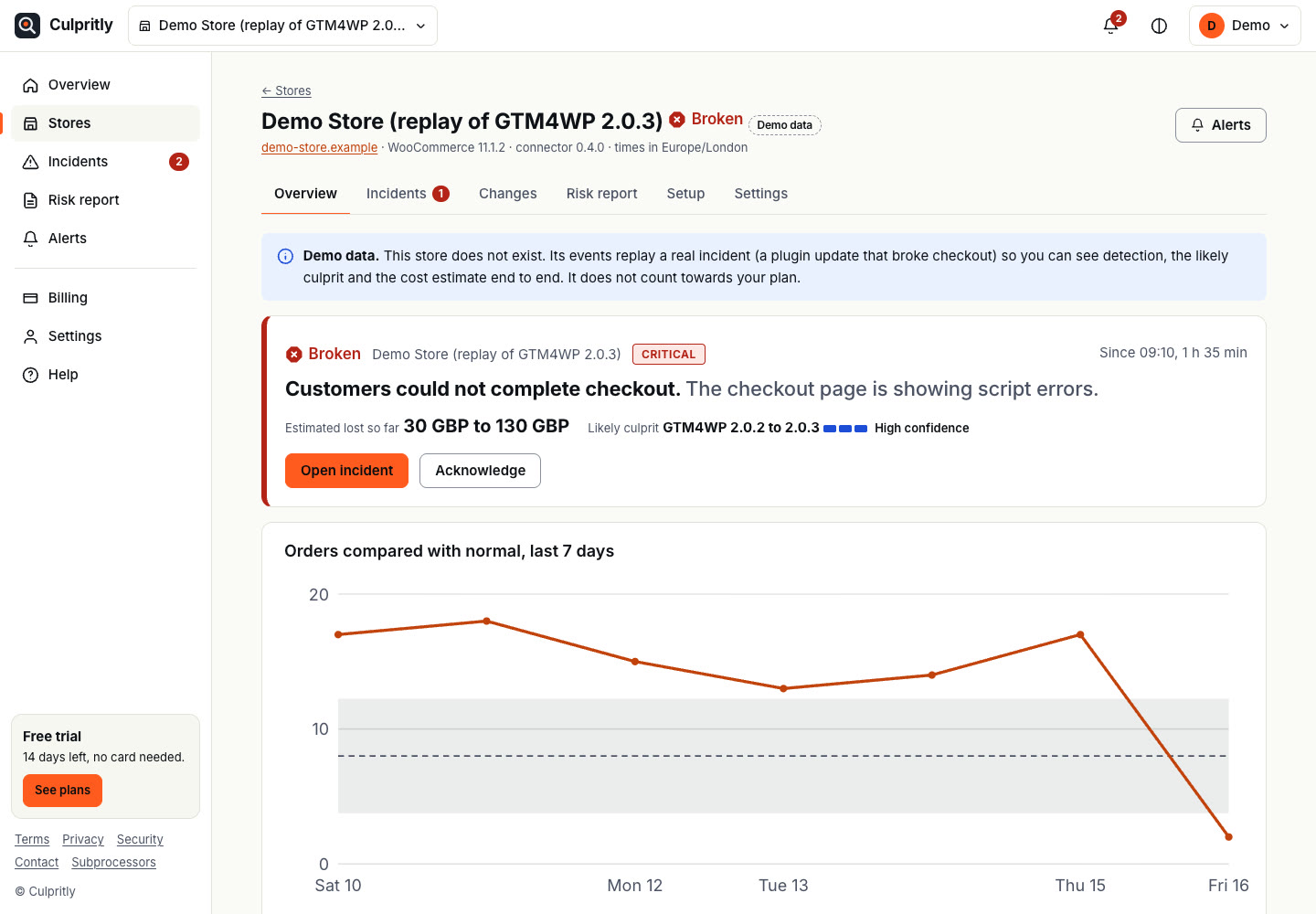
  1. Know the moment checkout breaks

    Orders against your normal pace, with the change that landed just before the drop marked on the chart.

    Culpritly store overview: a critical checkout incident and an orders chart falling to zero after a plugin update.
    Replay of the real GTM4WP 2.0.3 incident, shown as demo data.
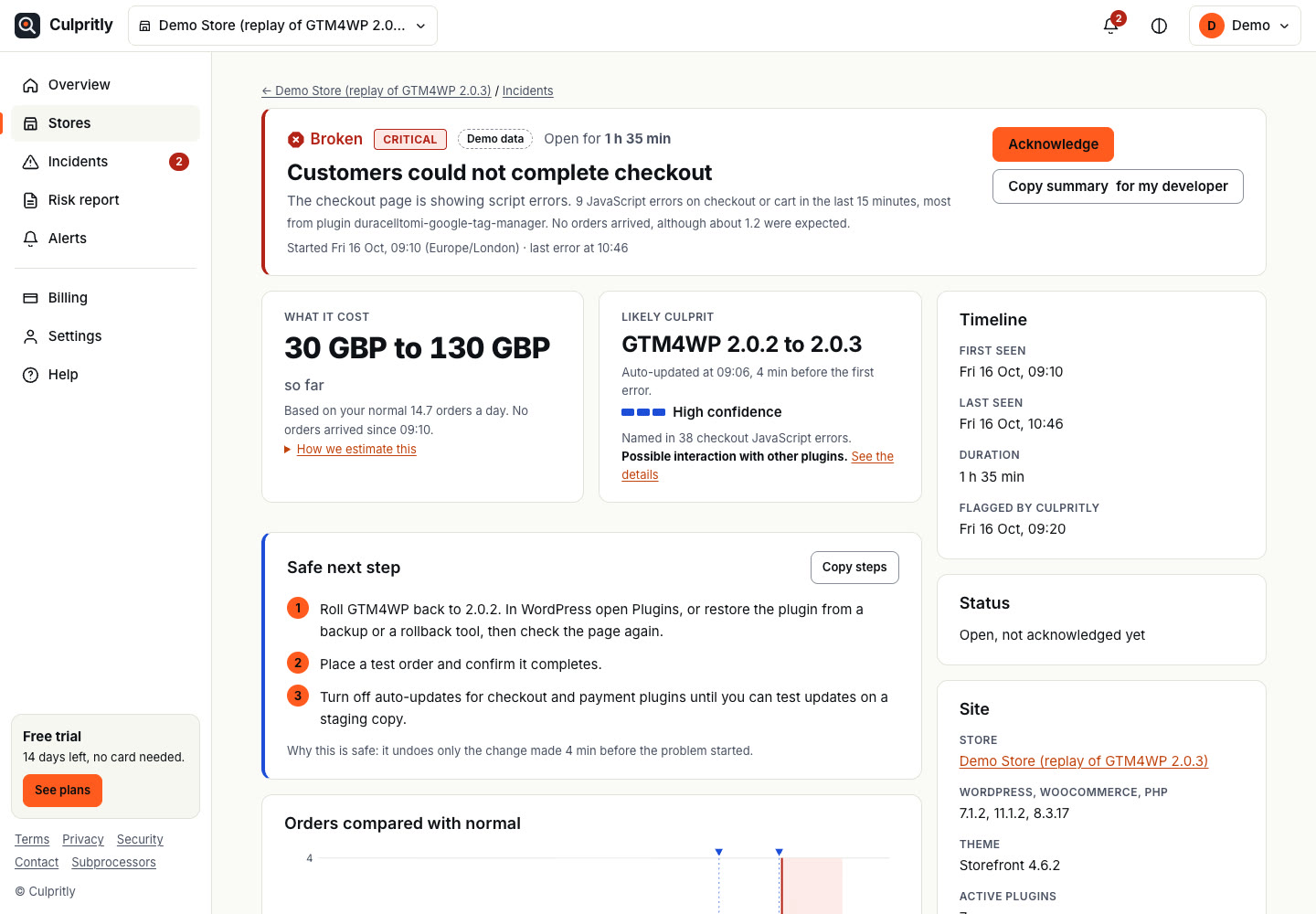
  2. Get the likely culprit and the cost

    One alert with the update most likely to blame, how sure we are, what it cost so far, and ranked safe first steps.

    Culpritly incident page: likely culprit GTM4WP 2.0.2 to 2.0.3 with high confidence, estimated cost, and three safe next steps.
    Demo data. The cost is an estimate range, not a promise.
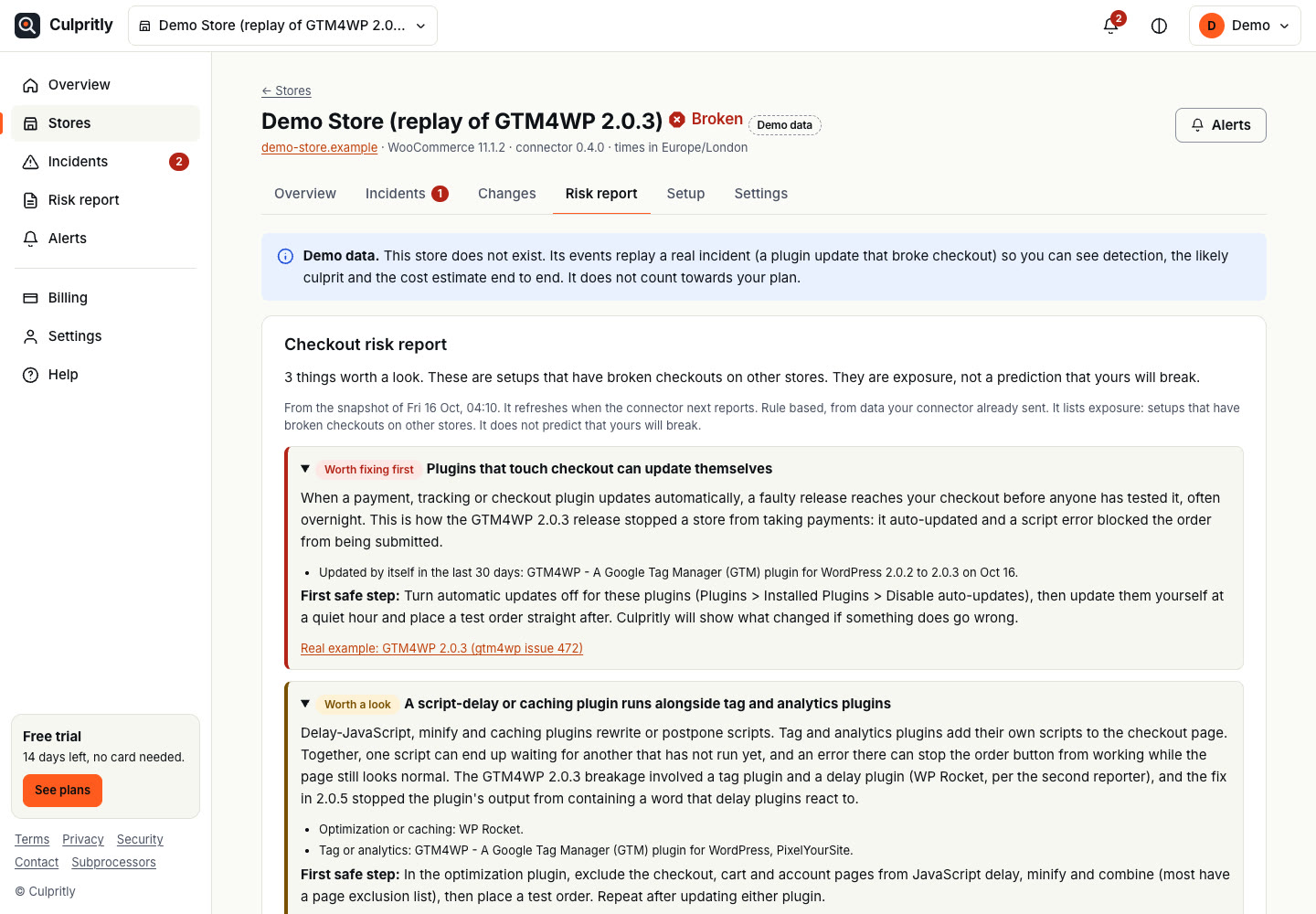
  3. Fix the setups that tend to break

    A risk report lists exposures that have broken other stores, each with a first safe step and a real public example.

    Culpritly checkout risk report listing plugin auto-updates and script-delay plugins as things worth fixing.
    Demo data. Rule based, it lists exposure and does not predict.

Proven on two real public incidents, replayed end to end: GTM4WP 2.0.3 and WooCommerce PayPal Payments 4.1.0.

How it works

From silent failure to a clear answer

  1. Install the connector

    Add the lightweight Culpritly plugin to your WooCommerce store or membership site. It sends small batches of events to Culpritly and stays out of your customers' way.

  2. Culpritly records and watches

    Every change is logged: plugin, theme and core updates, activations, and key WooCommerce and payment settings. Culpritly also watches checkout health: failed payments, checkout and signup errors, payment scripts that fail to load, a site that slows down under load, and orders slowing or stopping compared with your normal pace.

    Monitoring runs on our servers, so you still get alerted if your site is down.

  3. You get one clear alert

    When something breaks, Culpritly's AI incident analyst writes you a single plain-English alert: what changed, when orders dropped, the likely culprit and the evidence for it, the estimated revenue lost, and how to fix it.

    You stay in control. Nothing is rolled back without your OK.

Features

Built to answer one question fast: what broke checkout?

  • AI incident analyst

    When checkout breaks, the analyst reads the stack trace and error message, the changelog and the code diff between the old and new plugin versions (public on WordPress.org), and your store's change timeline. Then it explains why checkout broke and how to fix it.

    It always shows a likely cause together with the evidence behind it, never a guess presented as fact.

    What it reads (example)

    • ErrorTypeError on /checkout/ in tracking.js
    • Changelog2.0.3: "Load checkout script earlier"
    • Diff2.0.2 → 2.0.3, checkout script enqueue moved
    • TimelineUpdated 03:04, orders stopped 03:10
  • Change timeline

    Every plugin, theme and core update, activation, and key settings change on your store, in one timeline.

  • Silent checkout breakage detection

    Catches JavaScript errors on checkout and membership signup pages, payment scripts that fail to load (Stripe, PayPal, Square, Braintree), payment error pages and gateway failures, not just crashes and downtime.

  • Slowness and overload alerts

    Times your site every five minutes and alerts you when it gets far slower than its usual speed, the warning sign of peak-hour overload before customers give up or the site goes down.

  • Likely culprit

    Lines up your changes against checkout health and points to the change most likely to blame, with a confidence level.

  • Revenue impact in your currency

    Compares orders with your normal pace for that time of day and week, so you see an estimate of what the breakage is costing.

  • Owner-confirmed undo

    Each alert shows how to undo the change. A rollback only happens when you confirm it.

  • Weekly "changes and their cost" email

    A short weekly summary of what changed on your store and what, if anything, it cost you.

  • Email and Slack alerts

    Alerts arrive where you already look, by email or in a Slack channel.

  • Built by a WooCommerce engineer

    Designed by someone who works on payment gateway and checkout code, and has traced these failures by hand.

Pricing

Founding pricing

Culpritly is in early access. Founding stores help shape it.

Founding plan

First 10 stores only

$49/month

  • Everything in the product, including email and Slack alerts
  • Price locked for as long as you stay subscribed
  • Month to month, cancel any time
  • Free breakage replay before you commit
  • Your feedback shapes what gets built next
Start free trial
  • The 14 day trial needs no card and never turns into a paid plan by itself. Nothing is charged unless you subscribe.
  • $49 per month, billed monthly in advance. Taxes, if any, are added at checkout.
  • Renews automatically every month until you cancel.
  • Cancel any time in the app (Billing, then Manage billing). Access continues to the end of the paid period.
  • Refunds: ask within 14 days of your first payment for a full refund. Later months are not refunded.
  • Payments are handled by Lemon Squeezy. See the terms.

Planned regular pricing

Planned, and subject to change.

  • Store 1 store $49/mo
  • Growth 3 stores + Slack alerts $99/mo
  • Agency 10 stores + client reports $149/mo

FAQ

Questions site owners ask

Can I get a refund?

Yes. Ask within 14 days of your first payment and you get that payment back in full. The free trial needs no card. You can cancel any time and keep access until the end of the period you paid for. See the refund policy.

What does the AI actually do?

It explains incidents. When checkout breaks, it reads the error messages, the changelog and code diff of whatever changed, and your store's timeline, then writes a plain-English explanation of the likely cause and suggests a fix. It does not take actions on its own. Every suggestion shows the evidence it is based on, and you approve anything that changes your store.

Does Culpritly slow my site down?

It is built not to. The connector plugin is lightweight and sends small batches of events in the background. It adds no front-end scripts to your site except a tiny error listener on checkout and other payment pages, so Culpritly can see the JavaScript errors your customers run into.

What data does Culpritly collect?

Change events (what was updated or changed, and when), error messages from checkout and other payment pages, and order counts and totals so Culpritly can learn your store's normal pace. The connector does not read card fields and is not built to collect card data, and no customer personal data beyond what is needed to do the job. To write AI explanations, error messages, change events and relevant public plugin code are sent to an AI provider for analysis. The privacy page has the details.

Will Culpritly roll things back automatically?

No. Every alert explains how to undo the change, and a rollback only happens when you confirm it. Rollback is never offered for WooCommerce core or for updates that changed your database, because reversing those safely needs a person's judgment. For those, the alert explains how to recover.

Which payment gateways does Culpritly support?

Culpritly is starting with Stripe, WooPayments and PayPal. It also notices when the Stripe, PayPal, Braintree or Square payment script fails to load on a payment page. More gateways are planned.

Does it only work with WooCommerce?

No. Culpritly watches WooCommerce checkout and cart, the payment pages of Restrict Content Pro, MemberPress and Paid Memberships Pro, and any page you mark as a payment page in the plugin settings. Change tracking, error alerts and slowness alerts work on any WordPress site. Order revenue estimates currently need WooCommerce.

Does Culpritly work with Shopify?

Not yet. Culpritly is for WordPress sites for now: WooCommerce stores and membership sites. Shopify support is planned for later.

How is this different from an activity log or an uptime monitor?

An activity log records changes. An uptime monitor checks whether your site is up. Neither tells you that checkout quietly stopped working, which change caused it, or why. Culpritly connects your store's changes to checkout breakage and to the revenue it is costing you, and its AI incident analyst explains the cause in plain English with the evidence. The upcoming update risk check goes one step earlier and flags risky updates before you install them.

Is Culpritly ready today?

Culpritly is in early access. Founding stores get the free breakage replay first, then the product as each part ships, at a price that stays locked while they are subscribed.

A real case

Tested every week. A customer still found it first.

A membership site tested its updates every week and the tests passed. But when the payment provider's script loaded slowly, the membership plugin's code ran too early and failed. Visitors landed on a bare error page and a real customer found it first.

What Culpritly would have flagged

Payment page JavaScript error. The error on the signup page, with the script and plugin it came from, the first time a visitor hit it.

Payment error page. The signup that ended on an error page, with its message and the plugin that stopped it. One is enough for a high-priority alert.

Slowness alert. Response times climbing far above normal at peak hours, before the site went down.

Update risk check Coming soon

Warned before it breaks

The AI update risk check looks at updates before you install them. It reads the changelog and code diff of each pending update and flags the ones that touch checkout, payment gateways or cart scripts, with a risk level for your store. You decide whether to update off-peak or wait.

Later on the roadmap: Ask Culpritly. Ask questions about your store's timeline in plain English, like "Why did sales drop last Tuesday?"

Update risk check Example
Pending update
Checkout Tracking 2.0.3
Touches
Checkout scripts, Stripe payment form
Risk for your store
High
Suggestion
Update off-peak and watch the first orders.
Example check with made-up data. This feature is not available yet.

Who it's for

For people who answer for checkout

Store owners

Your revenue depends on checkout working. If an hour of zero orders would cost you real money, you want to hear about it from an alert, not from a customer or next month's sales report.

Membership and course sites

Signups and renewals are your revenue. Culpritly watches the signup and billing pages of Restrict Content Pro, MemberPress and Paid Memberships Pro, and any payment page you add, so a broken payment form does not go unnoticed until a member emails you.

Agencies and freelancers

You run care plans for several client sites. Culpritly helps you spot payment breakage across them, fix it before the client notices, and show them exactly what happened and what it cost.

Free offer

Get a free breakage replay

Book a 20-minute call. I'll replay your store's recent changes against your order history and show you what Culpritly would have caught. Free, no obligation.

  • Your recent plugin, theme and core changes on one timeline
  • Any dips in orders that line up with those changes
  • What a Culpritly alert would have told you, and when
Faisal Alvi, founder of Culpritly

Who's building it

Built by someone who has done this by hand

Culpritly is built by Faisal Alvi (opens in a new tab), a senior WooCommerce engineer who works on payment gateways and checkout code. He has spent years tracing exactly these failures by hand: reading logs, lining up update times against order drops, and working out which change broke checkout.

Culpritly is that process, written down and running all the time, so you get the answer without the hours of digging.